Materia KV
Materia is a new serverless databases offering by Clever Cloud. A whole range of services meeting the needs expressed by our customers in recent years, with an open and resilient approach. It includes deployment across multiple availability zones, compatibility with existing protocols, clients, and pay-as-you-go billing. It’s built on the FoundationDB open source transactional engine. A distributed and robust solution, notably thanks to its high simulation capacity.
Materia KV is the first publicly available product of this family. It’s a key-value database which comes with simplicity in mind. You have no instance size to choose, no storage capacity to worry about. We simply provide you with a host address, a port and a token: you’re ready to go! Once our servers send a reply message, your data is durable: it’s synchronously replicated over 3 data centers in Paris.
You don’t have to configure leaders, followers: high availability is included, by design.
Compatibility layers
We didn’t want this Materia KV to come at the cost of complex configuration, requiring the use of special clients and ORMs. That’s why we’ve developed its compatibility layers: each one lets you talk to Materia KV through an existing protocol, with the clients, CLIs and ORMs you already use — no Clever Cloud-specific SDK required.
Two layers are available:
- Redis API (and variants such as Redict and Valkey) — full read/write access, the primary way to interact with Materia KV.
- GraphQL — a typed, read-oriented view of the same keyspace, served from a standard GraphQL endpoint.
Both layers operate on the same underlying data, so any key written through the Redis API is immediately visible through GraphQL. For the Redis API layer specifically, you can use redis-cli, valkey-cli or alternatives such as iredis, as well as graphical clients we’ve tested successfully:
Create a Materia KV add-on
You can create a Materia KV add-on as simply as any other Clever Cloud service in the Console, following this link. Select the plan (free during Beta testing phase), an application to link to (or none), give it a name, and you’ll get access to its dashboard giving you connection details. Environment variables shared with a linked application are listed in the Service dependencies section.
We included them with the REDIS_ format. Thus, you can just try to replace a Redis or Valkey instance by Materia KV. It’s as simple as linking the new add-on, unlinking the old one and restarting your application! (Check commands you’ll need first).
You can also use clever tools to create a Materia KV add-on and set environment variables to test it with a PING command:
clever addon create kv ADDON_NAME
source <(clever addon env addon ADDON_ID -F shell)
redis-cli -h $KV_HOST -p $KV_PORT --tls PING
Here is an example of what you can expect:
$ clever addon create kv testKV

Add-on created successfully!
ID: addon_4997cfe3-f104-4d05-9fe4-xxxxxxxxx
Real ID: kv_01HV6NCSRDxxxxxxxxxxxxxxxx
Name: testKV

/!\ The Materia KV provider is in Beta testing phase, don't store sensitive or production grade data
You can easily use Materia KV with 'redis-cli', with such commands:
source <(clever addon env addon_4997cfe3-f104-xxxx-xxxx-xxxxxxxxx -F shell)
redis-cli -h $KV_HOST -p $KV_PORT --tls
You can also deploy Materia KV add-ons with Terraform provider (OpenTofu compatible).
Clever Cloud KV Explorer
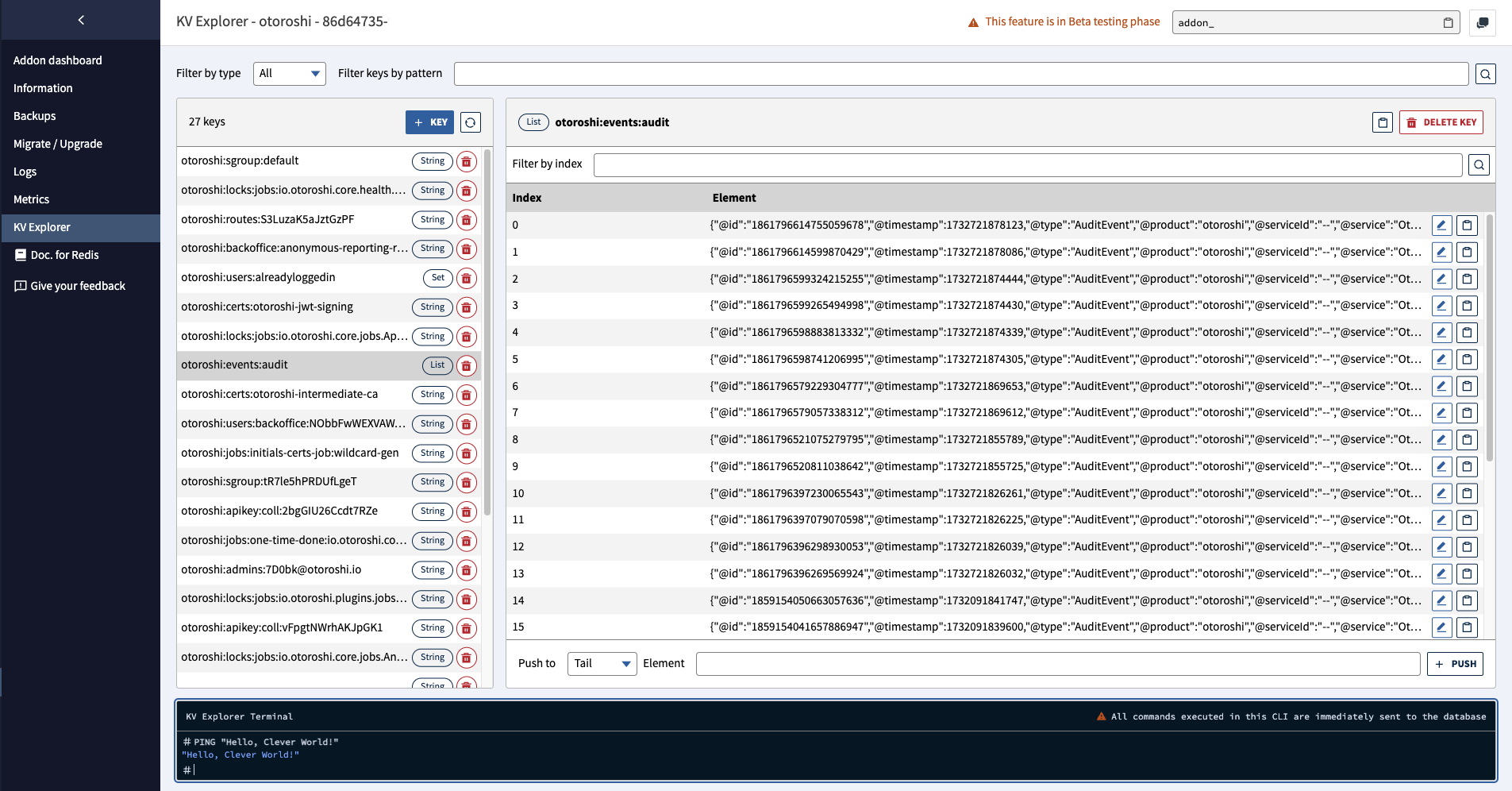
Access and edit your Key-Value databases with the KV Explorer tool, it’s part of Clever Cloud’s all included experience.
Supported data types
Hash, list, set and string types are supported. For Materia KV, only string type is currently available, with other types coming soon.
An intuitive, useful interface
The interface lets you filter keys by type and perform wildcard searches (for example: *value_to_search*). Value fields are multi-line for convenience, and you can copy/paste values directly from the interface. Special attention has been paid to accessibility and keyboard navigation with shortcuts to optimize your experience.
KV Explorer Terminal
At the bottom of the page, you’ll find an integrated terminal that works like a traditional CLI client. Type your commands and press Enter to execute them. All commands are supported, including FLUSHDB and FLUSHALL. Be careful with these as they erase data!
KV Explorer is in Beta testing phase and we’ll improve it over the coming months, thanks to your feedback and suggestions.
Using the Redis API compatible layer
Environment variables and CLI usage
To connect to a Materia KV add-on, you need 3 parameters: the host, the port and a token. You can set these parameters as environment variables by doing source <(clever addon env addon ADDON_ID -F shell). The variables set are:
$KV_HOSTand its alias$REDIS_HOST$KV_PORTand its alias$REDIS_PORT$KV_TOKENand its alias$REDIS_PASSWORD$REDIS_CLI_URL$REDISCLI_AUTH
You can directly use these environment variables to connect to a Materia KV add-on using redis-cli if REDISCLI_AUTH is set:
redis-cli -h $KV_HOST -p $KV_PORT --tlsMateria KV is also compatible with alternatives such as iredis.
Fish shell users
If you use the Fish shell, you can use the following command to set the environment variables:
clever addon env ADDON_ID -F shell | sourceClever KV
We’re exploring how Clever Tools can natively support Materia KV and helps you to manage such add-ons without any additional software or configuration. The clever kv command is available since version 3.11.
Supported types and commands
Supported value types are:
- Hash
- Set
- String
Find below the list of currently supported commands:
Commands | Description |
|---|---|
APPEND | If key already exists and is a string, this command appends the value at the end of the string. If key doesn’t exist it is created and set as an empty string, so APPEND will be similar to SET in this special case. |
AUTH | Authenticate the current connection using the token as password. |
CLIENT ID | Returns the ID of the current connection. A connection ID has is never repeated and is monotonically incremental. |
COMMAND | Return an array with details about every supported command. |
COMMAND COUNT | Return the number of supported commands. |
COMMAND DOCS | Return documentary information about commands. By default, the reply includes all the server’s commands. You can use the optional command-name argument to specify the names of one or more commands. The reply includes a map for each returned command. |
COMMAND INFO | Returns an array reply of details about multiple Materia KV commands. Same result format as COMMAND except you can specify which commands get returned. If you request details about non-existing commands, their return position will be nil. |
COMMAND LIST | Return an array of the server’s command names. |
DBSIZE | Return the number of keys in the currently-selected database. |
DECR | Decrements the number stored at key by one. If the key doesn’t exist, it is set to 0 before performing the operation. An error is returned if key contains a value of the wrong type or contains a string that can not be represented as integer. This operation is limited to 64-bit signed integers. |
DECRBY | Decrements the number stored at key by the given decrement. If the key doesn’t exist, it is set to 0 before performing the operation. An error is returned if key contains a value of the wrong type or contains a string that can not be represented as integer. This operation is limited to 64-bit signed integers. |
DEL | Removes the specified key. A key is ignored if it doesn’t exist. |
EXISTS | Returns if key exists. |
EXPIRE | Set a key time to live in seconds. After the timeout has expired, the key will be automatically deleted. The time to live can be updated using the EXPIRE command or cleared using the PERSIST command. |
EXPIREAT | Sets a key to expire at the specified Unix timestamp (in seconds). After that time, the key is automatically deleted. Returns 1 if the timeout was set, 0 if the key doesn’t exist. |
FLUSHALL | Delete all the keys of all the existing databases, not just the currently selected one. This command never fails. |
FLUSHDB | Delete all the keys of the currently selected DB. This command never fails. |
GET | Get the value of key. If the key doesn’t exist the special value nil is returned. An error is returned if the value stored at key is not a string, because GET only handles string values. |
GETBIT | Returns the bit value at offset in the string value stored at key. |
GETDEL | Gets the value of key and deletes the key. If the key doesn’t exist, returns nil. Returns an error if the value stored at key isn’t a string. |
GETRANGE | Returns the substring of the string value stored at key, determined by the offsets start and end (both are inclusive). Negative offsets can be used in order to provide an offset starting from the end of the string. So -1 means the last character, -2 the penultimate and so forth. |
HDEL | Removes the specified fields from the hash stored at key. Specified fields that do not exist within this hash are ignored. If key does not exist, it is treated as an empty hash and this command returns 0. |
HELLO | Switch to a different protocol, optionally authenticating and setting the connection’s name, or provide a contextual client report. It always replies with a list of current server and connection properties. |
HEXISTS | Returns 1 if field exists in the hash stored at key, 0 if field or key don’t exist. Returns an error if the value stored at key isn’t a hash. |
HGET | Returns the value associated with field in the hash stored at key. If key does not exist, or field is not present in the hash, nil is returned. |
HGETALL | Returns all fields and values of the hash stored at key. In the returned value, every field name is followed by its value, so the length of the reply is twice the size of the hash. |
HINCRBY | Increments the number stored at field in the hash stored at key by the given increment. If key doesn’t exist, creates a new key holding a hash. If field doesn’t exist, sets the value to 0 before performing the operation. Returns an error if the field contains a value of the wrong type or the resulting value exceeds a 64-bit signed integer. |
HLEN | Returns the number of fields contained in the hash stored at key. If key does not exist, it is treated as an empty hash and 0 is returned. |
HMGET | Returns the values associated with the specified fields in the hash stored at key. For every field that does not exist in the hash, a nil value is returned. Because of this, the operation never fails. |
HSCAN | Incrementally iterate over hash fields and associated values. It is a cursor based iterator, this means that at every call of the command, the server returns an updated cursor that the user needs to use as the cursor argument in the next call. An iteration starts when the cursor is set to 0, and terminates when the cursor returned by the server is 0. |
HSET | Sets the specified fields to their respective values in the hash stored at key. If key does not exist, a new key holding a hash is created. If key exists but does not hold a hash, an error is returned. |
HSETNX | Sets field in the hash stored at key to value, only if field doesn’t yet exist. If key doesn’t exist, creates a new key holding a hash. If field already exists, the operation has no effect. Returns 1 if field is a new field in the hash and the value was set, 0 if field already exists. |
INCR | Increments the number stored at key by one. If the key doesn’t exist, it is set to 0 before performing the operation. An error is returned if key contains a value of the wrong type or contains a string that can not be represented as integer. This operation is limited to 64-bit signed integers. |
INCRBY | Increments the number stored at key by the given increment. If the key doesn’t exist, it is set to 0 before performing the operation. An error is returned if key contains a value of the wrong type or contains a string that can not be represented as integer. This operation is limited to 64-bit signed integers. |
INCRBYFLOAT | Increment the string representing a floating point number stored at key by the specified increment. If the key does not exist, it is set to 0 before performing the operation. An error is returned if the key contains a value of the wrong type or a string that can not be represented as a floating point number. |
INFO | The INFO command returns information and statistics about the server in a format that is simple to parse by computers and easy to read by humans. |
JSON.DEL | Deletes JSON value at path from key. Returns the number of paths deleted. Can delete array elements or object fields. |
JSON.GET | Gets JSON value at path from key. Supports both single and multiple path queries with different path notations. |
JSON.SET | Sets JSON value at root path ($) and updating existing paths in key. Creates new key if it doesn’t exist. |
KEYS | Returns all keys matching pattern, can be * |
LOLWUT | Returns Materia KV’s version and might be hiding an easter egg 👀 |
MGET | Returns the values of all specified keys. For every key that doesn’t hold a string value or doesn’t exist, the special value nil is returned. Because of this, the operation never fails. |
MSET | Sets the given keys to their respective values. MSET replaces existing values with new values, just as regular SET. MSET is atomic, so all given keys are set at once. It is not possible for clients to see that some keys were updated while others are unchanged. |
PERSIST | Remove the existing time to live associated with the key. |
PEXPIRE | Set a key time to live in milliseconds. After the timeout has expired, the key will be automatically deleted. The time to live can be updated using the PEXPIRE command or cleared using the PERSIST command. |
PEXPIREAT | Sets a key to expire at the specified absolute Unix timestamp in milliseconds. After that time, the key is automatically deleted. Returns 1 if the timeout was set, 0 if the key doesn’t exist. |
PING | Returns PONG if no argument is provided, otherwise return a copy of the argument as a bulk. |
PTTL | Returns the remaining time to live of a key, in milliseconds. |
SADD | Add the specified members to the set stored at key. Specified members that are already a member of this set are ignored. If key doesn’t exist, a new set is created before adding the specified members. |
SCAN | Incrementally iterate over a collection of elements. It is a cursor based iterator, this means that at every call of the command, the server returns an updated cursor that the user needs to use as the cursor argument in the next call. An iteration starts when the cursor is set to 0, and terminates when the cursor returned by the server is 0. |
SCARD | Returns the set cardinality (number of elements) of the set stored at key. |
SDIFF | Returns the members of the set resulting from the difference between the first set and all the successive sets. |
SDIFFSTORE | This command is equal to SDIFF, but instead of returning the resulting set, it is stored in destination. If destination already exists, it is overwritten. |
SET | Set key to hold the string value. If key already holds a value, it is overwritten, regardless of its type. |
SETBIT | Sets or clears the bit at offset in the string value stored at key. |
SINTER | Returns the members of the set resulting from the intersection of all the given sets. |
SINTERCARD | Returns the number of elements that would result from the intersection of all given sets. |
SINTERSTORE | This command is equal to SINTER, but instead of returning the resulting set, it is stored in destination. If destination already exists, it is overwritten. |
SISMEMBER | Returns if member is a member of the set stored at key. |
SMEMBERS | Returns all the members of the set value stored at key. |
SMISMEMBER | Returns whether each member is a member of the set stored at key. For every member, 1 is returned if the value is a member of the set, or 0 if the element is not a member of the set or if key doesn’t exist. |
SMOVE | Move member from the set at source to the set at destination. This operation is atomic. In every given moment the element will appear to be a member of source or destination for other clients. |
SPOP | Removes and returns one or more random members from the set value stored at key. |
SRANDMEMBER | When called with just the key argument, return a random element from the set value stored at key. |
SREM | Remove the specified members from the set stored at key. Specified members that are not a member of this set are ignored. If key doesn’t exist, it is treated as an empty set and this command returns 0. |
SSCAN | Incrementally iterate over set elements. It is a cursor based iterator, this means that at every call of the command, the server returns an updated cursor that the user needs to use as the cursor argument in the next call. An iteration starts when the cursor is set to 0, and terminates when the cursor returned by the server is 0. |
STRLEN | Returns the length of the string value stored at key. An error is returned when key holds a non-string value. |
SUNION | Returns the members of the set resulting from the union of all the given sets. |
SUNIONSTORE | This command is equal to SUNION, but instead of returning the resulting set, it is stored in destination. If destination already exists, it is overwritten. |
TTL | Returns the remaining time to live of a key, in seconds. |
TYPE | Returns the string representation of the type of the value stored at key. Can be: hash, list, set or string. |
JSON commands
Materia KV provides preliminary support for JSON data type operations, compatible with Redis API JSON commands and clients. Unlike Redis JSON which uses a dedicated data type, our implementation works directly with classic string data types while maintaining API compatibility.
Path Syntax and Behavior
$: Root element (required for setting values, optional forGET/DEL)$.field: Access field in object$..field: Recursively search for all matching fields$.array[index]: Access array element by index.field: Shorthand notation (without$) returns a direct value instead of an array wrapper
Examples
# Setting and getting JSON
> JSON.SET myJsonKey $ '{"a":"23"}'
OK
> JSON.GET myJsonKey
"{\"a\":\"23\"}"
> JSON.GET myJsonKey $
"[{\"a\":\"23\"}]"
> JSON.GET myJsonKey $.a
"[\"23\"]"

# Multiple paths with different notations
> JSON.SET myJsonKey $ '{"f1":{"k1":["foo",42],"k2":["bar",53]},"f2":{"k1":["Hello",61]}}'
OK
> JSON.GET myJsonKey $.f1 $.f2
"{\"$.f1\":[{\"k1\":[\"foo\",42],\"k2\":[\"bar\",53]}],\"$.f2\":[{\"k1\":[\"Hello\",61]}]}"
> JSON.GET myJsonKey .f1 .f2
"{\".f1\":{\"k1\":[\"foo\",42],\"k2\":[\"bar\",53]},\".f2\":{\"k1\":[\"Hello\",61]}}"

# Recursive search
> JSON.GET myJsonKey $..k1
"[[\"foo\",42],[\"Hello\",61]]"

# Array manipulation
> JSON.SET myJsonKey $ '{"a":[1,2,3,4]}'
OK
> JSON.DEL myJsonKey $.a[1]
(integer) 1
> JSON.GET myJsonKey
"{\"a\":[1,3,4]}"
Current Limitations
JSON.SETcan only create new documents at root path ($)JSON.SETcan’t create new fields in existing documents- Nested path creation is not supported (e.g.,
$.new.child.field) - Keys in your JSON must not contains characters like
..,*,[?(
Using the GraphQL compatibility layer
In addition to the Redis API, Materia KV exposes a GraphQL endpoint. It reads from the same keyspace as the Redis API layer — every key you write through the Redis API is immediately queryable through GraphQL, with no synchronization layer in between. Both interfaces authenticate with the same token, and that token scopes each request to your add-on’s data on the shared cluster.
The GraphQL layer is read-only today — mutations aren’t supported yet. Use the Redis API for writes.
Endpoint and authentication
Materia KV is a distributed cluster: the GraphQL endpoint is a single URL shared by every add-on in a given region, over HTTPS on the standard port. For the Paris region, it is:
https://materiakv-graphql.eu-fr-1.services.clever-cloud.com/graphqlAuthentication uses the same token as the Redis API ($KV_TOKEN / $REDIS_PASSWORD), passed as a bearer token:
curl -X POST "https://materiakv-graphql.eu-fr-1.services.clever-cloud.com/graphql" \
  -H "Authorization: Bearer $KV_TOKEN" \
  -H "Content-Type: application/json" \
  -d '{"query":"{ __typename }"}'
Missing or invalid credentials return HTTP 401 with the error in the GraphQL errors array. This endpoint returns HTTP 200 for all other errors (wrong-type reads, unknown fields, mutation requests, validation errors), with the details in errors.
GraphiQL playground
Opening the GraphQL URL in a browser (plain GET) serves an embedded GraphiQL playground: an in-browser IDE with autocompletion, query history and a documentation explorer. Every request — including the schema introspection that powers autocomplete and the docs explorer — needs your token, otherwise GraphiQL displays Error fetching schema.
Initial setup, once per browser session:
At the bottom of the query panel, click the Headers tab (next to
Variables).Paste your token as a JSON object:
{
  "Authorization": "Bearer <your-token>"
}
Click the Re-fetch GraphQL schema icon at the bottom of the left sidebar (the circular-arrow icon, keyboard shortcut
Ctrl+Shift+R). Introspection runs with your header, and the full schema becomes browsable.
Once the header is set, the Docs Explorer (book icon, also in the left sidebar) shows the full type tree: every query, every argument, every return type, with the descriptions baked into the schema.
Fetching the schema
Introspection is enabled, so you can pull the schema directly from the endpoint in three common ways.
Browse it in GraphiQL — follow the setup above (headers + re-fetch), then click the Docs Explorer icon in the left sidebar.
Raw JSON introspection via
curl— useful for scripts and CI:curl -X POST "https://materiakv-graphql.eu-fr-1.services.clever-cloud.com/graphql" \ -H "Authorization: Bearer $KV_TOKEN" \ -H "Content-Type: application/json" \ -d '{"query":"{ __schema { queryType { name fields { name } } types { name kind } } }"}'Download as SDL (the classic
.graphqlschema file) using any introspection tool, such asget-graphql-schema:npx -y get-graphql-schema \ -h "Authorization=Bearer $KV_TOKEN" \ "https://materiakv-graphql.eu-fr-1.services.clever-cloud.com/graphql" > schema.graphql
The resulting file plugs straight into code generators, IDE plugins, and schema-aware editors.
Queries
The schema exposes a single root type, MateriaKvQuery, with queries for strings, hashes and sets — including single-key lookups, batched reads, pattern matching and server-side set algebra (setIntersection, setDifference, setUnion). Fetch the full list of queries and their signatures through introspection (see Fetching the schema above) or browse them in the GraphiQL Docs Explorer.
Single-key queries (string, hash, hashField, getSetMembers) return a nullable object — null when the key doesn’t exist. Pattern and batch queries return non-null lists (possibly empty).
Query examples
Fetch a single string, including its expiration:
query ReadSession($key: String!) {
  string(key: $key) {
    key
    value
    expireAt
  }
}
Read a structured record in one round-trip:
query GetUser($key: String!) {
  hash(key: $key) {
    key
    fields { name value }
  }
}
Combine several reads into one request using aliases:
query Dashboard {
  admins: getSetMembers(key: "group:admins") { members }
  active: getSetMembers(key: "group:active") { members }
  overlap: setIntersection(keys: ["group:admins", "group:active"])
}
Always pass user input through GraphQL variables rather than string interpolation: the server type-checks every variable, which reduces injection risk and avoids query string interpolation issues:
curl -X POST "https://materiakv-graphql.eu-fr-1.services.clever-cloud.com/graphql" \
  -H "Authorization: Bearer $KV_TOKEN" \
  -H "Content-Type: application/json" \
  -d '{
    "query": "query($k:String!){ string(key:$k){ key value } }",
    "variables": { "k": "session:xyz" }
  }'
JSON values read through GraphQL
JSON documents written via JSON.SET are stored on top of strings. The schema has no dedicated GraphQL type for JSON: read the document back through string(key) as the serialized payload and parse it client-side. Partial JSON paths (JSON.GET key $.field) are only available through the Redis API.
Current behaviors and limitations
- Queries on a key of the wrong type (e.g.
hash(key)on a string key) return a GraphQL error —Database operation failed: Operation against a key holding the wrong kind of value— rather thannull. Make sure your query type matches the Redis type at the same key. stringsByPattern(pattern)rejects a call where the pattern matches more than 100 keys with an error (Database operation failed: Max batch size exceeded: N > 100) — results are not silently truncated. Narrow the pattern (or walk the keyspace through several tighter prefixes) when the match count is larger.strings(keys: [...])has the same hard limit: at most 100 keys per call. Chunk larger batches on the client side.- Pattern-based queries (
hashesByPattern,setsByPattern,hashFieldsByPattern) are not paginated: each call returns its full result set in one response. Keep patterns focused to avoid oversized payloads. - Glob patterns follow the Redis
KEYS/SCANsyntax (*,?,[abc]). - The
expireAtfield is an absolute instant (ISO 8601), not a remaining TTL — parse it as an ISO 8601 timestamp in your client, then subtract the current time to compute a countdown. - Authentication errors return HTTP 401 with the message in the
errorsarray. Every other GraphQL error (wrong-type reads, mutation requests, validation errors) returns HTTP 200 witherrorspopulated.
Demos and examples
We’ve prepared a few examples to help you get started with Materia KV:
Did this documentation help you ?